
Command Line Hero - second day
kill
most important options :
● -9
● -15
tee
example :
ls |tee ls-clh
ps
options
● -a all processes in this session
● -x
● -u
● -o
● -p process id
example :
ps -o pid,user,rss,vsz,%mem,%cpu -p $$⭐
diffrent between rss vsz
top
● -n
● -b
Examples :
ps -o pid,user,rss,vsz,%mem,command -a |sort -rk 5 | awk '{print}'
ps -o pid,user,rss,vsz,%cpu,command -u danial |sort -rk 5 | awk '{print}'
gawk '{ sum += $1 }; END { print sum }' file
awk '{ $NF=$NF OFS $NF }1' OFS='\t' /proc/loadavg

top -n 5 -b|grep "load average:"| awk '{print substr($12, 1, length($12)-1)} {sum+=$12} ; END {print sum}'

top -n 5 -b|grep "load average:"| awk '{print substr($12, 1, length($12)-1)} {sum+=$12} ; END {print "---" ; print sum/5}
systemctl
● start
● restart
● stop
● daemon
● enable
● disable
● journalctl
/usr/lib/systemd/system
ssh
sshfs
ssh.keygen
How to use ssh-keygen to generate a new SSH key
This page is about the version of ssh-keygen. For , see . If you wish to generate keys for , see PuTTYgen on Windows or PuTTYgen on Linux . Ssh-keygen is a tool for creating new authentication key pairs for SSH. Such key pairs are used for automating logins, single sign-on, and for authenticating hosts.
 https://www.ssh.com/ssh/keygen/
Ssh-copy-id for copying SSH keys to servers
ssh-copy-id installs an on a server as an authorized key. Its purpose is to provision access without requiring a password for each login. This facilitates automated, passwordless logins and single sign-on using the SSH protocol. The ssh-copy-id tool is part of . Key based authentication in SSH is called public key authentication .
https://www.ssh.com/ssh/copy-id/
rsync -av --progress -e 'ssh -p 2222' /home/danial/tmp/os clh@172.30.205.63:tmp/2rsync -av --progress -e 'ssh -p 2222' ~/part-class/tmp/1 clh@172.30.205.63:tmpsshfs -p 2222 clh@172.30.205.63:/home/clh/tmp/ /home/danial/part-class/mnted-dir/
read this
How to check os version in Linux command line - nixCraft
I am a new Linux system user. How do I check os version in linux command line? Linux is a free and open source operating system. There are many variants of Linux out there. They are typically called Linux distribution. Suse, OpenSUSE, Debian, Ubuntu, CentOS, Arch, Fedora, RHEL all are common Linux distribution names.
 https://www.cyberciti.biz/faq/how-to-check-os-version-in-linux-command-line/
cat /etc/os-release
crontab
crontab -eAn example Linux crontab file
Linux crontab format FAQ: Do you have an example of a Unix/Linux crontab file format? I have a hard time remembering the crontab file format, so I thought I'd share an example crontab file here today. The following file is the root crontab file from a CentOS Linux server I use in a test environment.
 http://alvinalexander.com/linux/linux-crontab-file-format-example/
Crontab in Linux with 20 Useful Examples to Schedule Jobs - TecAdmin
The crontab is used for running specific tasks on a regular interval. Linux crontab is similar to windows task schedules. Crontab is very useful for routine tasks like scheduling system scanning, daily backups, etc. Crontab executes jobs automatically in the back-end at a specified time and interval.
 https://tecadmin.net/crontab-in-linux-with-20-examples-of-cron-schedule/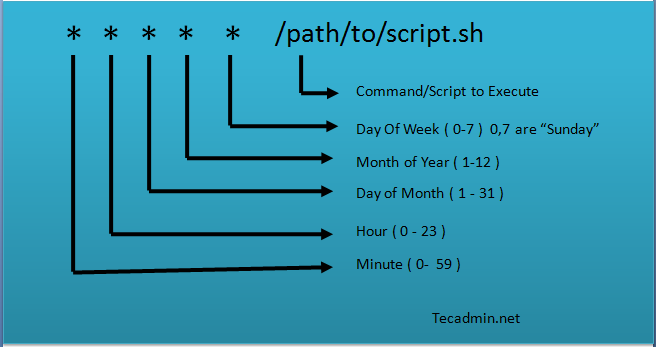
ip
arp
arp -a
ss
curl