
Linux Tools
Tmux Cheat Sheet & Quick Reference
Start a new session Start a new session with the name mysession $ tmux kill-ses -t mysession $ tmux kill-session -t mysession kill/delete session mysession kill/delete all sessions but the current $ tmux kill-session -a -t mysession kill/delete all sessions but mysession Rename session Detach from session Detach others on the session (Maximize window by detach other clients)
w3m linux command man page
Section: User Commands (1)Updated: Local Index Return to Main Contents w3m - a text based Web browser and pager w3m [options] [URL or filename] w3m is a World Wide Web (WWW) text based client. It has English and Japanese help files and an option menu and can be configured to use either language.
 https://www.commandlinux.com/man-page/man1/w3m.1.html
Without a GUI - How to Live Entirely in a Terminal
Sure, it may be hard, but it is possible to give up graphical interfaces entirely - even in 2020. This article was first published in the June, 2019 issue of Linux Journal. With the closing of Linux Journal, it is being re-published here.
https://lunduke.com/posts/2020-03-04/

visit1985/mdp
mdp needs the ncursesw headers to compile. So make sure you have them installed: on Raspbian (Raspberry Pi) you need libncurses5-dev and libncursesw5-dev Now download and install mdp: $ git clone https://github.com/visit1985/mdp.git $ cd mdp $ make $ make install $ mdp sample.md On Arch Linux, you can use the existing package.

sharkdp/fd
中文 한국어 fd is a simple, fast and user-friendly alternative to . While it does not seek to mirror all of find's powerful functionality, it provides sensible (opinionated) defaults for 80% of the use cases. Convenient syntax: fd PATTERN instead of find -iname '*PATTERN*'. Colorized terminal output (similar to ls).

sharkdp/hyperfine
中文 A command-line benchmarking tool. Statistical analysis across multiple runs. Support for arbitrary shell commands. Constant feedback about the benchmark progress and current estimates. Warmup runs can be executed before the actual benchmark. Cache-clearing commands can be set up before each timing run. Statistical outlier detection to detect interference from other programs and caching effects.
Home
bpython is a fancy interface to the Python interpreter for Linux, BSD, OS X and Windows (with some work). bpython is released under the MIT License. It has the following (special) features: In-line syntax highlighting Readline-like autocomplete with suggestions displayed as you type. Expected parameter list for any Python function.
 https://bpython-interpreter.org/
mbbill/undotree
The plug-in visualizes undo history and makes it easier to browse and switch between different undo branches. You might wonder what is undo "branches"? It's vim feature that allows you to go back to a state when it is overwritten by a latest edit.

Auto-Generated Python Documentation with Sphinx (See comments for update fix)
EDIT: The behaviour of sphinx-quickstart appears to have changed since this video was posted (where sphinx==1.6.7). Please see comments for updated fix.**F...
 https://www.youtube.com/watch?v=b4iFyrLQQh4
python3 sphinx documentation generator
python3 sphinx auto document generatorhttp://sphinx-doc.org/# noteshttps://github.com/thesheff17/youtube/blob/master/sphinx/sphinx.txt
https://www.youtube.com/watch?v=qrcj7sVuvUA
Amjith Ramanujam Awesome Command Line Tools PyCon 2017
"Speaker: Amjith RamanujamDesigning a good command line tool is challenging. Command line tools look archaic compared to modern graphical interfaces, discove...
https://www.youtube.com/watch?v=hJhZhLg3obk
PEP 350 -- Codetags
This PEP has been rejected. While the community may be interested, there is no desire to make the standard library conform to this standard. This informational PEP aims to provide guidelines for consistent use of codetags, which would enable the construction of standard utilities to take advantage of the codetag information, as well as making Python code more uniform across projects.

Documentation - The Hitchhiker's Guide to Python
Comments clarify the code and they are added with purpose of making the code easier to understand. In Python, comments begin with a hash (number sign) (). In Python, docstrings describe modules, classes, and functions: In general, follow the comment section of PEP 8#comments (the "Python Style Guide").
 https://docs.python-guide.org/writing/documentation/
python tagging comments - Google Search
A comment in Python starts with the hash character, # , and extends to the end of the physical line. A hash character within a string value is not seen as a comment, though. To be precise, a comment can be written in three ways - entirely on its own line, next to a statement of code, and as a multi-line comment block.
python type hinting - Google Search
typing - Support for type hints - Python 3.9.1 documentation
Source code: Lib/typing.py Note The Python runtime does not enforce function and variable type annotations. They can be used by third party tools such as type checkers, IDEs, linters, etc. The function below takes and returns a string and is annotated as follows: In the function , the argument is expected to be of type and the return type .
 https://docs.python.org/3/library/typing.html
Type hints cheat sheet (Python 3) - Mypy 0.790 documentation
PEP 484 -- Type Hints
PEP 3107 introduced syntax for function annotations, but the semantics were deliberately left undefined. There has now been enough 3rd party usage for static type analysis that the community would benefit from a standard vocabulary and baseline tools within the standard library.
Example Google Style Python Docstrings - Sphinx 4.0.0+ documentation
"""Example Google style docstrings. This module demonstrates documentation as specified by the `Google Python Style Guide`_. Docstrings may extend over multiple lines. Sections are created with a section header and a colon followed by a block of indented text. Example: Examples can be given using either the ``Example`` or ``Examples`` sections.
Documenting Your Project Using Sphinx - an_example_pypi_project v0.0.5 documentation
This covers just a few of the many many commands available via sphinx. For more, visit http://sphinx.pocoo.org/. Also, another great site with just an overview of more common commands is http://docs.geoserver.org/trunk/en/docguide/sphinx.html. To get started, into the documentation directory and type: $ sphinx-quickstart Please enter values for the following settings (just press Enter to accept a default value, if one is given in brackets).
https://pythonhosted.org/an_example_pypi_project/sphinx.html

Sphinx and RST syntax guide (0.9.3)
Let us consider a python module called (see bottom of the page). With Sphinx, you can auto-document this module by including the following code within a RST document: This code will scan the module template.py, find all its members, undocumented members and add their docstrings.
https://thomas-cokelaer.info/tutorials/sphinx/docstring_python.html
https://www.programiz.com/python-programming/docstrings](https://www.programiz.com/python-programming/docstrings)
python docstring sphinx - Google Search
In general, a typical Sphinx docstring has the following format: ... Service` objects, which match the provided ``uuids`` :rtype: list On Python 3.x, this returns a ...
Pipenv: Python Dev Workflow for Humans - pipenv 2020.11.16.dev0 documentation
Pipenv is a tool that aims to bring the best of all packaging worlds (bundler, composer, npm, cargo, yarn, etc.) to the Python world. Windows is a first-class citizen, in our world. It automatically creates and manages a virtualenv for your projects, as well as adds/removes packages from your as you install/uninstall packages.

mastodon social network - Google Search
Please click here if you are not redirected within a few seconds. Mastodon is a free and open-source self-hosted social networking service. It allows anyone to host their own server node in the network, and its various separately operated user bases are federated across many different servers. These nodes are...
Intro to Using Python Type HInts
Implementing Type Hints in PythonMyPy- https://pypi.org/project/mypy/MyPy Cheat Sheet- https://mypy.readthedocs.io/en/latest/cheat_sheet_py3.htmlUsing Type H...
https://www.youtube.com/watch?v=3m7uTWqwg34
How to Configure Vim like VSCode
Learn how to setup Vim like VSCode. I use Neovim, coc.vim, NERDTree, gruvbox, and more...init.vim: https://gist.github.com/benawad/b768f5a5bbd92c8baabd363b7e...
https://www.youtube.com/watch?v=gnupOrSEikQ
13 smart terminal tools to level up your Linux servers | Serverwise
Developers either tend to love or hate the Linux server's terminal. You have people like Matt, our CEO, who has told me many times that he could spend an entire day on the Linux terminal and love every second of it. And you have the rest of us, who need a little help and encouragement.
 https://blog.ssdnodes.com/blog/13-smart-terminal-tools-to-level-up-your-linux-servers/
Get started with this open source to-do list manager
Last year, I brought you 19 days of new (to you) productivity tools for 2019. This year, I'm taking a different approach: building an environment that will allow you to be more productive in the new year, using tools you may or may not already be using.

20 productivity tools for the Linux terminal
Many of us, admittedly, only use computers because they're fun. But some people use computers to get stuff done, and their theory is computers are supposed to make things faster, better, and more organized. In practice, though, computers don't necessarily improve our lives without a little manual reconfiguration to match our individual work styles.

50 Useful Command Line Tools Developers Will Love: Productivity, Development, Utility, and More
Developers and those with engineering responsibilities are fond of calling terminal their home. Anyone with a Unix system has to frequently interact with the Terminal in one way or the other. And customization has always been a big part of how much the Terminal can be used to improve productivity, create unique experiences, and manage the system to improve the workflow.
 https://stackify.com/top-command-line-tools/
My Favorite CLI Tools
Previously, I wrote about my favorite Mac apps. But I spend half of my time in the terminal, and I have a handful of CLI tools that makes my life easier. Here are some of them. Shell - the most...
 https://medium.com/swlh/my-favorite-cli-tools-c2fa484cee52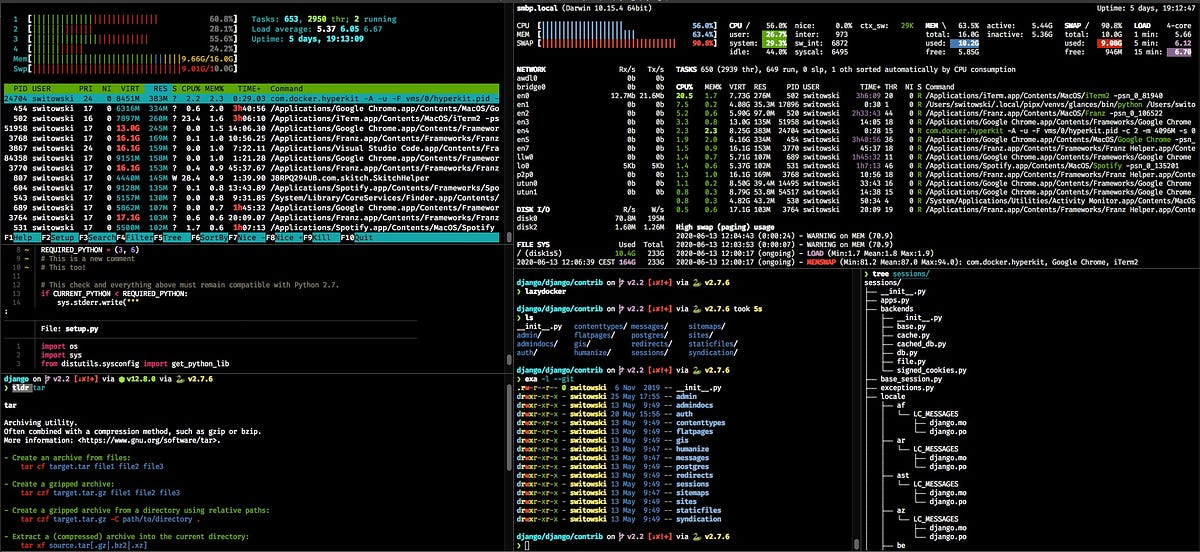
My Favorite CLI Tools
Previously, I wrote about my favorite Mac apps. But I spend half of my time in the terminal, and I have a handful of CLI tools that makes my life easier. Here are some of them. Shell - the most...
https://medium.com/swlh/my-favorite-cli-tools-c2fa484cee52Get Your Work Done Faster With These To Do List Apps on Linux Desktop
Getting work done is super important. If you have a planned list of things to do, it makes your work easier. So, it's no surprise why we're talking about to-do list apps on Linux here. Sure, you can easily utilize some of the best note taking apps on Linux for this purpose but using a dedicated to-do app helps you stay focused on work.
 https://itsfoss.com/to-do-list-apps-linux/
Taskwarrior - What's next?
Get the whole source and history from our git repository. You will need git installed. Disclaimer: The master branch represents the latest stable release. All other branches are development branches, and are works in progress and may not pass all quality tests, therefore may harm your data.
 https://taskwarrior.org/download/
Ultralist: Amazing task management for tech folks
Ultralist is a simple, powerful, open source task management system for the command line. Ultralist has a beautiful CLI UX that is designed to be as intuitive to use as possible. Ultralist is built for speed. It is written in Go. Use powerful filtering to customize ultralist to how you work best.

https://jrnl.sh/en/stable/installation/
Tmux Cheat Sheet & Quick Reference
Start a new session Start a new session with the name mysession $ tmux kill-ses -t mysession $ tmux kill-session -t mysession kill/delete session mysession kill/delete all sessions but the current $ tmux kill-session -a -t mysession kill/delete all sessions but mysession Rename session Detach from session Detach others on the session (Maximize window by detach other clients)
w3m linux command man page
Section: User Commands (1)Updated: Local Index Return to Main Contents w3m - a text based Web browser and pager w3m [options] [URL or filename] w3m is a World Wide Web (WWW) text based client. It has English and Japanese help files and an option menu and can be configured to use either language.
https://www.commandlinux.com/man-page/man1/w3m.1.htmlsharkdp/fd
中文 한국어 fd is a simple, fast and user-friendly alternative to . While it does not seek to mirror all of find's powerful functionality, it provides sensible (opinionated) defaults for 80% of the use cases. Convenient syntax: fd PATTERN instead of find -iname '*PATTERN*'. Colorized terminal output (similar to ls).
mbbill/undotree
The plug-in visualizes undo history and makes it easier to browse and switch between different undo branches. You might wonder what is undo "branches"? It's vim feature that allows you to go back to a state when it is overwritten by a latest edit.
PEP 350 -- Codetags
This PEP has been rejected. While the community may be interested, there is no desire to make the standard library conform to this standard. This informational PEP aims to provide guidelines for consistent use of codetags, which would enable the construction of standard utilities to take advantage of the codetag information, as well as making Python code more uniform across projects.
Type hints cheat sheet (Python 3) - Mypy 0.790 documentation
PEP 484 -- Type Hints
PEP 3107 introduced syntax for function annotations, but the semantics were deliberately left undefined. There has now been enough 3rd party usage for static type analysis that the community would benefit from a standard vocabulary and baseline tools within the standard library.
All my bookmarks have gone
Description of the issue: out of the blue every thing in brave have deltetd bookmarks history sites that i am sign in How can this issue be reproduced? i didnot now Expected result: Brave Version( check About Brave): Version 0.70.121 Chromium: 78.0.3904.70 (Official Build) (32-bit) Additional Information:
 https://community.brave.com/t/all-my-bookmarks-have-gone/132996/6