import cv2
import numpy as np
import imutils
from math import atan2,degrees
import matplotlib.pyplot as plt

# this function will give us the rotation angel of eyes
def GetAngleOfLineBetweenTwoPoints(p1, p2):
    xDiff = p2[0] - p1[0]
    yDiff = p2[1] - p1[1]
    return degrees(atan2(yDiff, xDiff))

# reading the haarcascades pre-trained classifiers
baseCascadePath = "/home/danial/tmp/glassesOnFace_demo/"
faceCascadeFilePath = baseCascadePath + "haarcascade_frontalface_default.xml"
noseCascadeFilePath = baseCascadePath + "haarcascade_eye.xml"
face_cascade = cv2.CascadeClassifier(faceCascadeFilePath)
eye_cascade = cv2.CascadeClassifier(noseCascadeFilePath)

# reading the glasses image
glass_img = cv2.imread('glass_image.jpg')

video_capture = cv2.VideoCapture(0)

rFlag = False

hface = 1
wface = 1
xface = 0
yface = 0

# TODO: remember to change this to False
testDemmo = False
while True:
    # Capture video feed
    ret, image = video_capture.read()
    gray = cv2.cvtColor(image, cv2.COLOR_BGR2GRAY)

    centers = []
    faces = face_cascade.detectMultiScale(gray, 1.16, 5)

    # iterating over the face detected
    for (x, y, w, h) in faces:
        if testDemmo == True:
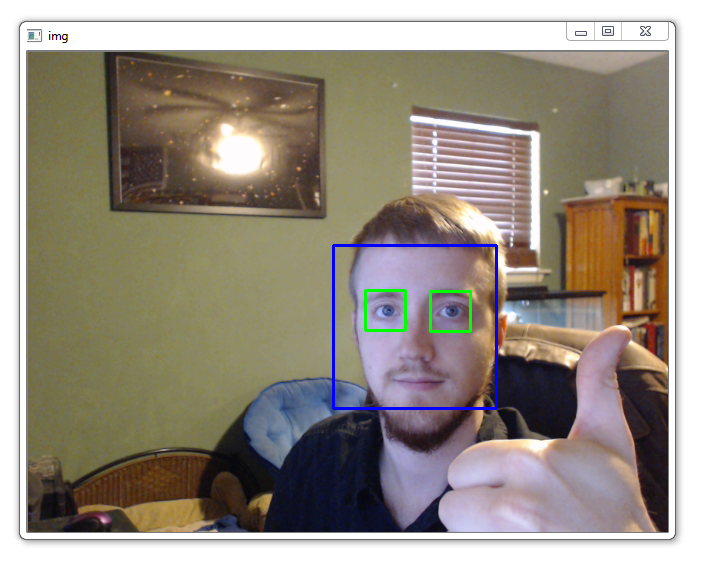
            cv2.rectangle(image,(x,y),(x+w,y+h),(255,0,0),2)

        # create two Regions of Interest.
        roi_gray = gray[y:y + h, x:x + w]
        roi_color = image[y:y + h, x:x + w]
        eyes = eye_cascade.detectMultiScale(
            roi_gray,
            scaleFactor= 1.16,
            minNeighbors=30,
            minSize=(25, 25),
            flags=cv2.CASCADE_SCALE_IMAGE
        )

        # Store the coordinates of eyes in the image to the 'center' array
        for (ex, ey, ew, eh) in eyes:
            hface = h
            wface = w
            xface = x
            yface = y

            centers.append((x + int(ex + 0.5 * ew), y + int(ey + 0.5 * eh)))
            if testDemmo == True:
                cv2.rectangle(roi_color,(ex,ey),(ex+ew,ey+eh),(0,255,0),2)


    if len(centers) > 1 :
        # because the haarcascades classifier dont give us the eyes coordinates with respect to their order ,we need to organize them ourself
        # by order i mean which one comes first from left
        if centers[0][0] < centers[1][0]:
            rFlag = True
        else :
            rFlag = False

        if testDemmo == True:
            cv2.putText(image,'R',(centers[1][0] + 5,centers[1][1] + 5), 1, 1, (0, 255, 0), 1)
            cv2.putText(image,'L',(centers[0][0] + 5,centers[0][1] + 5), 1, 1, (0, 255, 0), 1)

        # change the given value of 2.15 according to the size of the detected face
        # the value '2' will give us good enough results (better that 2.15)
        glasses_width = 2 * abs(centers[1][0] - centers[0][0])
        overlay_img = np.ones(image.shape, np.uint8) * 255
        second_overlay_img = np.ones(image.shape, np.uint8) * 255

        h, w = glass_img.shape[:2]
        scaling_factor = glasses_width / w

        # here we resize the glasses based on eyes distance
        overlay_glasses = cv2.resize(glass_img, None, fx=scaling_factor, fy=scaling_factor, interpolation=cv2.INTER_AREA)

        x = centers[0][0] if centers[0][0] < centers[1][0] else centers[1][0]

        # The x and y variables below depend upon the size of the detected face.
        x -= 0.26 * overlay_glasses.shape[1]
        y += 0.85 * overlay_glasses.shape[0]

        # Slice the height, width of the overlay image.
        h, w = overlay_glasses.shape[:2]
        overlay_img[int(y):int(y + h), int(x):int(x + w)] = overlay_glasses

        # change glasses rotation angel based on eyes rotation
        if rFlag == True :
            eyes_rotation = int(GetAngleOfLineBetweenTwoPoints(centers[1],centers[0]))
        else:
            eyes_rotation = int(GetAngleOfLineBetweenTwoPoints(centers[0],centers[1]))
        # eyes_rotation = int(GetAngleOfLineBetweenTwoPoints(centers[1],centers[0]))
        if eyes_rotation > 90 or eyes_rotation < -90:
            glasses_rotation = 180 - eyes_rotation
        else:
            glasses_rotation = 180 + eyes_rotation
        # glasses_rotation = 10
        overlay_img = imutils.rotate(overlay_img, glasses_rotation)

        # this will copy the face box from the glasses image so that you couldnt see the image black background
        # i added a 5 to the y cause we turned floats to int and the glasses were a little off
        second_overlay_img[int(yface)+5:int(yface + hface)+5, int(xface):int(xface + wface)] = overlay_img[int(yface):int(yface + hface), int(xface):int(xface + wface)]

        # Create a mask and generate it's inverse.
        gray_glasses = cv2.cvtColor(second_overlay_img, cv2.COLOR_BGR2GRAY)

        ret, mask = cv2.threshold(gray_glasses, 110, 255, cv2.THRESH_BINARY)
        mask_inv = cv2.bitwise_not(mask)
        temp = cv2.bitwise_and(image, image, mask=mask)

        temp2 = cv2.bitwise_and(second_overlay_img, second_overlay_img, mask=mask_inv)
        image = cv2.add(temp, temp2)

        # imS = cv2.resize(final_img, (1366, 768))
    cv2.imshow('glasses', image)
    # cv2.waitKey()
    if cv2.waitKey(1) & 0xFF == ord('q'):
        break

video_capture.release()
cv2.destroyAllWindows()