

workspace manager - final year project
Danial's college final year project
This application helps you manage your working time and task by auto-filling your timesheet and letting you import issues from Jira only by their issue key, also the front end app is written in flutter so you can run it on multiple platforms without any problem.
Work Manager
Jira API
Not able to create a JiraRestClientI am trying to create a JiraRestClient using Basic authentication. JiraRestClientFactory factory = new AsynchronousJiraRestClientFactory(); URI jiraServerUri = getJiraUri(); JiraRestClient restClient = factory .createWithBasicHttpAuthentication(jiraServerUri, USERNAME, PASSWORD); However, I am g... https://community.atlassian.com/t5/Jira-Software-questions/Not-able-to-create-a-JiraRestClient/qaq-p/644959
 Atlassian account
https://id.atlassian.com/manage-profile/security/api-tokens
https://developer.atlassian.com/cloud/jira/platform/rest/v3/api-group-issues/#api-rest-api-3-issue-issueidorkey-get
What is advanced searching in Jira Cloud? | Jira Software Cloud | Atlassian SupportThe advanced search allows you to build structured queries using the Jira Query Language (JQL) to search for issues. You can specify criteria that you can't define in the quick or basic searches (the ORDER BY clause, for example). tip/resting Created with Sketch. If you don't have complex search criteria, try quick search instead. https://support.atlassian.com/jira-software-cloud/docs/what-is-advanced-searching-in-jira-cloud/
notion API
- remember to first share the database with the integration
Start building with the Notion APIConnect Notion pages and databases to the tools you use every day, creating powerful workflows.https://developers.notion.com/reference/get-databases
 https://developers.notion.com/reference/retrieve-a-databaseConnect Notion pages and databases to the tools you use every day, creating powerful workflows.Retrieve a Page - Notion's Public API Workspace
 https://www.postman.com/notionhq/workspace/notion-s-public-api-workspace/request/15568543-8a70cbd1-7dbe-4699-a04e-108084a9c31bGitHub - seratch/notion-sdk-jvm: A Notion SDK for Any JVM LanguageA simple and easy to use client for the Notion API Here is an Notion API SDK for any JVM language users 👋 This project aims to provide a Notion API client for any JVM language developers without hurdles. To realize the goal, its code is written in Kotlin with a nice consideration for Java compatibility.
https://github.com/seratch/notion-sdk-jvm
Start building with the Notion APIConnect Notion pages and databases to the tools you use every day, creating powerful workflows.
 REST API
GitHub API
firebase for notifications
Todoist API
Todoisthttps://todoist.com/app/settings/integrations
 SyncThis is the official documentation for Todoist Sync API. A reference to the functionality our public API provides with detailed description of each API endpoint, parameters, and examples. In the Getting started section we will try to present the Sync API in the simplest possible way, by using real examples based on common tasks.
 https://developer.todoist.com/sync/v8/#complete-a-task-and-delete-another-taskREST API Reference | Todoist DeveloperThis is the official documentation for Todoist REST API. Our original API, named Sync API, provides an easy way to deal with full and partial syncs, but it's not so simple for individual calls. Our REST API aims to provide developers a simple way to consume the most basic features of Todoist API.https://developer.todoist.com/rest/v1/#get-a-user-39-s-projectsGuides | Todoist DeveloperThanks for your interest in developing apps with Todoist! In this guides section we'll provide an overview of the APIs we offer and cover some common topics for application development using our APIs. If you are looking for reference documentation for our APIs please proceed to either the REST API Reference or Sync API Reference.https://developer.todoist.com/guides/#developing-with-todoistSyncThis is the official documentation for Todoist Sync API. A reference to the functionality our public API provides with detailed description of each API endpoint, parameters, and examples. In the Getting started section we will try to present the Sync API in the simplest possible way, by using real examples based on common tasks.https://developer.todoist.com/sync/v8/#get-project-infohttps://todoist.com/help/articles/search-for-tasks-by-due-dateFind answers to common questions and learn how to use Todoist for yourself and your team.
 https://todoist.com/help/articles/search-for-tasks-by-due-date
 API retrieve tasks through filterI want to make a system for myself that only shows me one task from Todoist at a time, preferably the top one from a pre-specified filter so it can span multiple projects. However, when looking at the API specs, it seems like you can create a filter, but not retrieve tasks belonging to it.
 https://www.reddit.com/r/todoist/comments/bnd2m9/api_retrieve_tasks_through_filter/REST API Reference | Todoist DeveloperThis is the official documentation for Todoist REST API. Our original API, named Sync API, provides an easy way to deal with full and partial syncs, but it's not so simple for individual calls. Our REST API aims to provide developers a simple way to consume the most basic features of Todoist API.https://developer.todoist.com/rest/v1/#adding-a-new-task
google calendar
OAuth 2.0 PlaygroundThe access token below is provided after going through Step 1. It is a short lived token which gives you access to the user's OAuth protected resources. Note: The OAuth Playground will automatically revoke refresh tokens after 24h. You can avoid this by specifying your own application OAuth credentials using the Configuration panel. https://developers.google.com/oauthplayground/?code=4/0AX4XfWiL8CwGNB1mwQMaiXmreyL95QteOpwai90lQ8jeIZz47Z51d_7C6OyFl056TkPRFg&scope=https://www.googleapis.com/auth/calendar
 Flutter: Use Google Calendar API - Adding the events to CalendarAdd new events or create a new event in Google Calendar using Google Calendar API using OAUTH 2.0 Access Credentials in Flutter mobile app. You will need to create a google console project, get Client ID and use the Client ID to create a new event
 https://medium.com/flutter-community/flutter-use-google-calendar-api-adding-the-events-to-calendar-3d8fcb008493
 cell_calendar | Flutter PackageModern calendar widget with useful features. Enables to develop well designed calendar in a moment. Inspired by the UI of Google Calendar You can show the events in the calendar by inserting the list of CalendarEvent as events CellCalendar( events: [ CalendarEvent(eventName: "Event 1",eventDate: DateTime1), CalendarEvent(eventName: "Event 2",eventDate: DateTime2), ] ); If you need to customize the calendar more, the additional parameters like eventBackGroundColor, eventTextColor and eventID are helpful.
 https://pub.dev/packages/cell_calendar
 Scheduling and managing Google Meet events in Flutter | Codemagic BlogCodemagic builds and tests your app after every commit, notifies selected team members and releases to the end user. Automatically. Get started Written by Souvik Biswas In this article, I will show how you can use the Google Calendar API to schedule and manage Google Meet video conference events in Flutter.
https://blog.codemagic.io/google-meet-events-in-flutter/
 syncfusion_flutter_calendar | Flutter PackageThe Flutter Calendar widget has built-in configurable views such as day, week, workweek, month, schedule, timeline day, timeline week, timeline workweek and timeline month that provide basic functionalities for scheduling and representing appointments/events efficiently. Disclaimer: This is a commercial package. To use this package, you need to have either a Syncfusion commercial license or Free Syncfusion Community license.https://pub.dev/packages/syncfusion_flutter_calendar
Raspberry Pi idea
https://github.com/danial2026/Skin-Clothes-Hair-Segmentation-using-SMPKazuhito00 - RepositoriesYou can't perform that action at this time. You signed in with another tab or window. You signed out in another tab or window. Reload to refresh your session. Reload to refresh your session.PoseHuman pose estimation from video plays a critical role in various applications such as quantifying physical exercises, sign language recognition, and full-body gesture control. For example, it can form the basis for yoga, dance, and fitness applications. It can also enable the overlay of digital content and information on top of the physical world in augmented reality.https://google.github.io/mediapipe/solutions/pose.htmlOn-device, Real-time Body Pose Tracking with MediaPipe BlazePosePose estimation from video plays a critical role enabling the overlay of digital content and information on top of the physical world in augmented reality, sign language recognition, full-body gesture control, and even quantifying physical exercises, where it can form the basis for yoga, dance, and fitness applications.https://ai.googleblog.com/2020/08/on-device-real-time-body-pose-tracking.html
 Human pose estimation using Deep Learning in OpenCVI recently came across a very interesting use-case of computer vision and AI. Runners Need is a UK based sports shoe brand. They offer automated gait analysis using computer vision before they sell you a customized shoe. Gait analysis is a method for identifying biomechanical abnormalities in the way in which you walk or run.
 https://cv-tricks.com/pose-estimation/using-deep-learning-in-opencv/
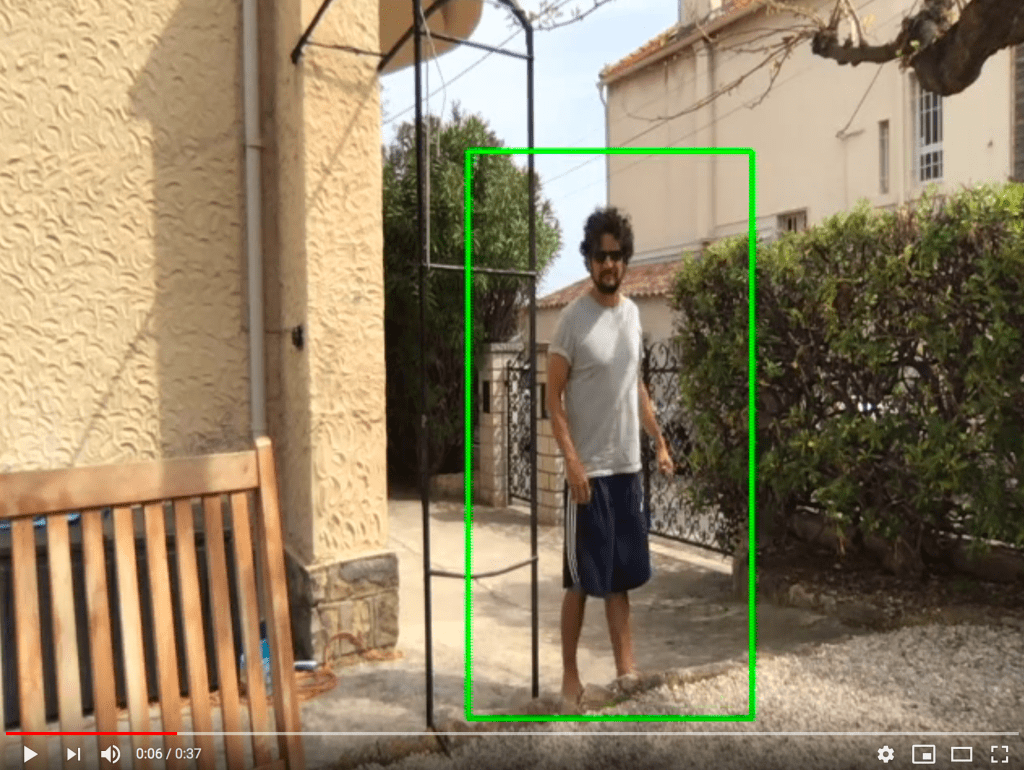
 Real-time Human Detection with OpenCVLet's use the HOG algorithm implemented in OpenCV to detect people in real time in a video stream! Today, we will write a program that can detect people in a video stream, almost in real-time (it will depend on how fast your CPU is.)
https://thedatafrog.com/en/articles/human-detection-video/

other links
A Notes App For MacOS
A Notes App For MacOS
 https://iosexample.com/a-notes-app-for-macos/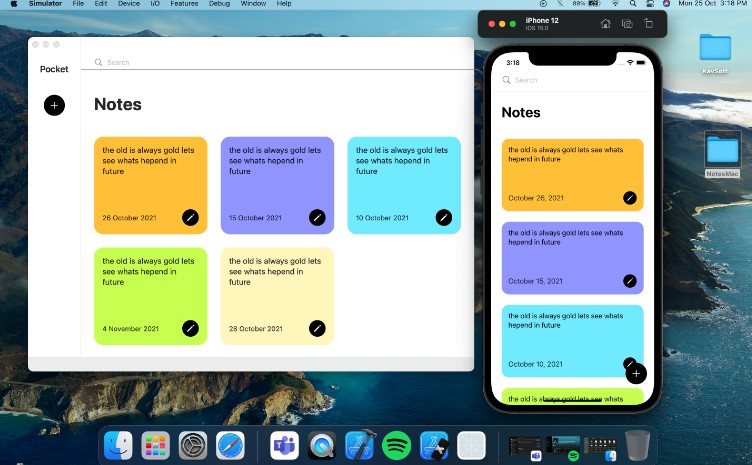
GitHub - myvsparth/flutter_rest_api: How to integrate REST API in Flutter
How to integrate REST API in Flutter In this article we will learn how to integrate REST API in flutter app. As we know that now a days almost all the app uses remote data using APIs. This article will be the crucial part for any developer who wants to make their future in flutter.
Charts | Sheets API | Google Developers
The Sheets API lets you create and update charts within spreadsheets as needed. The examples on this page illustrate how you can achieve some common charts operations with the API. In these examples, the placeholders spreadsheetId and sheetId are used to indicate where you would provide those IDs.
 https://developers.google.com/sheets/api/samples/charts
Google Sheets API | Google Developers
Reads and writes Google Sheets. To call this service, we recommend that you use the Google-provided client libraries. If your application needs to use your own libraries to call this service, use the following information when you make the API requests. A Discovery Document is a machine-readable specification for describing and consuming REST APIs.
https://developers.google.com/sheets/api/reference/restPulling JSON data into Google Sheets from an API
I recently setup a website for a client who needed a newsletter sign-up process (e.g., subscribe, verify, unsubscribe). To collect the e-mail addresses from the website I am using AWS API Gateway along with a Lambda and DynamoDB for storage. This solution works well; however, it is difficult for a client to retrieve data stored in DynamoDB without headache.
https://josh-weston.medium.com/pulling-json-data-into-google-sheets-from-an-api-963012482933
Connect Google Sheets with 3rd Party API Using Apps Script
Apps Script, as defined by Google is a rapid application development platform that makes it fast and easy to create business applications that integrate with G Suite. Basically it allows you to write codes for Google's services like Gmail, Google Drive, Sheets, Calendar, etc to automate your workflow or interact with external services.
https://medium.com/@sagunshrestha/connect-google-sheets-with-3rd-party-api-using-apps-script-121da46969bd
How to consume any JSON API using Google Sheets, and keep it up-to-date automagically
Google Sheets are very powerful when you know how to use them. You can do so much with those, and at Unly, we rely on them to automate many things, without relying on developers to build custom tools. #productivity Most of today's online services provide ways of extracting data into a spreadsheet, whether it's CSV, Google Sheets, Excel, etc.
https://medium.com/unly-org/how-to-consume-any-json-api-using-google-sheets-and-keep-it-up-to-date-automagically-fb6e94521abdcall your api from google sheet
API Tutorial For Beginners with Google Sheets and Apps Script
In this API tutorial for beginners, you'll learn how to connect to APIs using Google Apps Script, to retrieve data from a third-party and display it in your Google Sheet.
 https://www.benlcollins.com/apps-script/api-tutorial-for-beginners/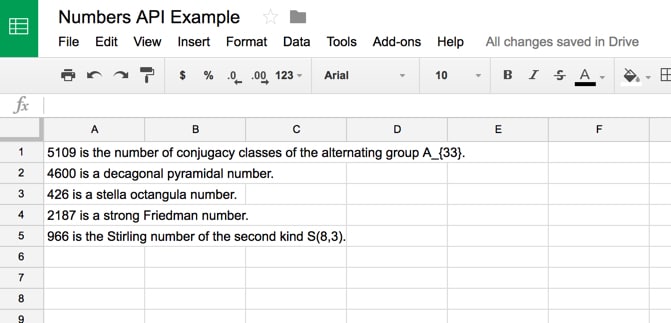
Sign in - Google Accounts

Google Apps Script as a Backend Part II: Time to REST
In Part I of the tutorial, we handled very basic data retrieval from our "database", i.e., spreadsheet. Today, we will build a basic "REST-ish" API to access it. It will not adhere to all the rules of REST because of some Google-Apps-Script limitations, but it will be intuitive enough for anyone who has ever worked with REST.
 https://x-team.com/blog/google-apps-script-rest/
https://github.com/PatilShreyas/Flutter2GoogleSheets-Demo
Work with long lists
The standard constructor works well for small lists. To work with lists that contain a large number of items, it's best to use the ListView.builder constructor. In contrast to the default ListView constructor, which requires creating all items at once, the ListView.builder() constructor creates items as they're scrolled onto the screen.
 https://flutter.dev/docs/cookbook/lists/long-lists
Meet Google Drive - One place for all your files
Google Drive is a free way to keep your files backed up and easy to reach from any phone, tablet, or computer. Start with 15GB of Google storage - free.
Google Sheets - create and edit spreadsheets online, for free.
Create a new spreadsheet and edit with others at the same time -- from your computer, phone or tablet. Get stuff done with or without an internet connection. Use Sheets to edit Excel files. Free from Google.
Write your first Flutter app, part 1
Tip: This codelab walks you through writing your first Flutter app. You might prefer to try writing your first Flutter app on the web. If you prefer an instructor-led version of this codelab, check out the following workshop: This is a guide to creating your first Flutter app.
https://flutter.dev/docs/get-started/codelab
Flutter: Apps Script with Google Sheet
Flutter has been able to grab the attention of the development community by introducing a style that allows for expressive liberty making it a joy to build UIs for mobile apps. It incorporates certain concepts familiar to modern development experiences like reactive programming and widget composition while using the Dart platform as its main base of operations.
https://medium.com/flutter-community/flutter-apps-script-with-google-sheet-938d95a9a33f
Apps Script
Apps Script is a rapid application development platform that makes it fast and easy to create business applications that integrate with G Suite. Start Scripting Build with Google Feature-rich APIs let you extend Google services and build your own web applications. Code on the Web A web browser is all you need to build with Google Apps Script.
 https://script.google.com/home/projects/1omDN1rU51Kgpa0r22-1K32rN17MgywMgxTgy0GzLYQSIZRpWY0T_6lOY/edit
https://github.com/PatilShreyas/Flutter2GoogleSheets-Demo
Google Apps Script as a Backend Part II: Time to REST
In Part I of the tutorial, we handled very basic data retrieval from our "database", i.e., spreadsheet. Today, we will build a basic "REST-ish" API to access it. It will not adhere to all the rules of REST because of some Google-Apps-Script limitations, but it will be intuitive enough for anyone who has ever worked with REST.
https://x-team.com/blog/google-apps-script-rest/API Post request in Google App Script not working - Pretag
I managed to do the API POST request through Postman but once modified for Google App Script it doesn't work. I think it might be related to the body format, I can't replicate the new URLSearchParams() object in GAS (I'm sending a JSON I believe)., Are people with a PhD least likely to be vaccinated in the US?
 https://pretagteam.com/question/api-post-request-in-google-app-script-not-working